


So you want to know how to make a farm account for Resident Evil Survival Unit? You are in the right place! We will walk you through all the steps so you can get up and running and cashing in on those resources ASAP.

Farm accounts are a huge part of progressing in base-builder games. Whether you came from State of Survival, or any of the older grind-heavy mobile titles, you already know how big of a difference a resource-producing “alt account” can make.


Before You Start: What You Need to Know About Farm Accounts in Resident Evil: Survival Shelter
Resident Evil: Survival Shelter actually makes farm accounts easy. Each login (Gmail, X, Discord, etc.) can create two characters per world/server.
So for example:
-
You log in with BobTheGamer@gmail.com
-
Your main is on Server 50
-
You want a farm on Server 50
→ The game simply lets you create that second account. You can be gathering tasty resources in 10 minutes or so! 😀
In other words, every player automatically gets:
-
1 Main account
-
1 Farm account
(per world)
And yes, if you want even more farms, that’s possible too with a little extra setup. Many players do this once they realize how useful farms are.
I always tell people: Make the first farm with the built-in system. Then expand only if you really need more.

What You’ll Want Before Making a Farm
Farm accounts are allowed, but managing them smoothly is easier if you set yourself up right. Here’s what I recommend:
Table of Contents
1. A second device or an Android emulator (recommended)
Having a backup phone, tablet, or PC emulator (Bluestacks, LDPlayer, etc.) makes switching between your main and your farm painless. Otherwise, you’ll be bouncing in and out of account menus constantly.
2. A little patience
Your farm account still needs to run through the beginner tutorial before it becomes useful. It’s quick, but not instant. If you want to go back and play the fun games from the start again… now is your chance. But you also have the option to skip all the puzzles, story, and walking around parts if you want.
Let’s get into it….
Step-by-Step: How to Create Your Farm Account in RE: Survival Shelter
Step 1 — Launch the Game With Your Main Login
Open the game using the same Gmail/Apple/X/Discord login you normally use.
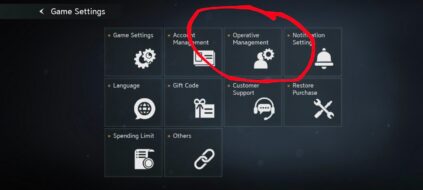
Step 2 — Go to “Account Management”
Inside the game:

-
Tap your player profile (top-left corner)
-
Tap Settings Gear
-
Tap Operative Management
-
Look for Create New Operative
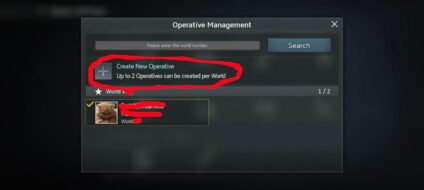


This is your built-in farm slot.
Step 3 — Create the Farm on the Same Server
Select:
Create New Operative –> Select World –> Select the world your main is on (it will have a 1 in it already) –> Confirm create Operative on World


Step 4 — Complete the Tutorial (Again) 3:15
Your farm starts exactly like your main account did:
-
Run through the tutorial
-
Unlock the base
-
Build the early structures
-
Get your first resource production running
- Join your farm alliance
IF you want to play the story again. You can.. If you just want to have your farm account, look for the Pause sign in the top right corner and rapidly skip all the screens. You should be able to skip 80% of the puzzle and just have to click through some Kate dialog, and when new characters join.


This takes maybe 10-20 minutes.
Doing it again for this guide, it took me with rapid clicks and skipping to get to the point where you can join an alliance in about 10 minutes. Just following allows the circle and does the bare minimum of things required to advance to the next part of the tutorial.
Step 5 — Start Building Your Farm Like a Resource Factory
Your farm’s job is simple:
-
Produce resources
-
Gather from the map
-
Join your farm alliance
-
Attack your farm alliance
Some people keep farms at a very low level to avoid high upkeep and enemy attention. Others level farms aggressively for faster production. Both strategies work depending on your server and your enemies. Discuss it over with your teammates to see what works better for you. OR Create ANOTHER group of farm accounts and try out both types…

How to Create MORE Than One Farm (Advanced)
If you want multiple farms, here’s how players usually do it:
✔ Option A — Use Extra Gmail/Facebook Accounts
Each extra login gives you:
-
1 Main slot
-
1 Farm slot
→ Per world
So if you want 4 farms:
-
Login #1 = Main + Farm
-
Login #2 = Farm
-
Login #3 = Farm
(Just don’t level the “main” on those logins — keep them as farms.)
✔ Option B — Use Emulator Cloning
Most Android emulators allow:
-
Multiple instances
-
Multiple login profiles
-
Multiple installs of the same game
This is how heavy farmers run 4–10 farms simultaneously.

⚠️ Important Notes & Warnings
-
Don’t violate Terms of Service
Farms are allowed, but botting, automation, or macros can get banned quickly. -
Protect your login info
Never give farm logins to other players. -
Use only the allowed switching methods
Don’t rely on third-party cloning apps if the emulator already handles multiple accounts safely. -
Always bind new accounts
Otherwise, if your phone dies, your farm is gone forever. 

You Now Have a Fully Functional Farm Account
Whether you’re building:
-
A light farm
-
A heavy farm
-
A full multi-farm setup
-
A farm empire (you know who you are)
…Resident Evil: Survival Shelter gives you a surprisingly smooth way to do it.
